
Step-by-step guide · husshusshussai.org

How to Make a Huss Huss Huss Video

Turn a single front-facing photo into a watermark-free 15-second gym lip-sync MP4: your subject delivers the “In This Town” opener, turns sideways with a dumbbell for three sharp “huss” breaths, and finishes the routine on camera — with the original sound included and no CapCut template required.

01 / Checklist

What you need

  • One clear photo of a person, dog, cat, or character — front-facing, head and chest in frame, mouth visible, no sunglasses or hats covering the face
  • A signed-in husshusshussai.org account with credits (new accounts start at 0 credits): 100 credits for 480p ($6.99 Starter pack) or 300 credits for 720p ($19.99 Creator pack)
  • About a minute to upload your photo and select a resolution before starting the render

Photo input specifications

Input requirementSpecification
File typesJPEG, PNG, WebP, or GIF
Image dimensions300–6000 px per side
Aspect ratio0.4–2.5
Maximum file size20 MB
Recommended framingOne clear, front-facing subject with head and chest visible
Output delivered15-second vertical 9:16 watermark-free MP4 with original sound

02 / Verified 480p example

What one photo produces at 480p

Before starting your own render, inspect an unedited 15-second 480p output generated directly from one front-facing portrait — watermark-free with the original sound included.

Person · 1 photo → 15s MP4480p · 15s · 100 cr · No watermark

Front-facing portrait at the gym

Input photo
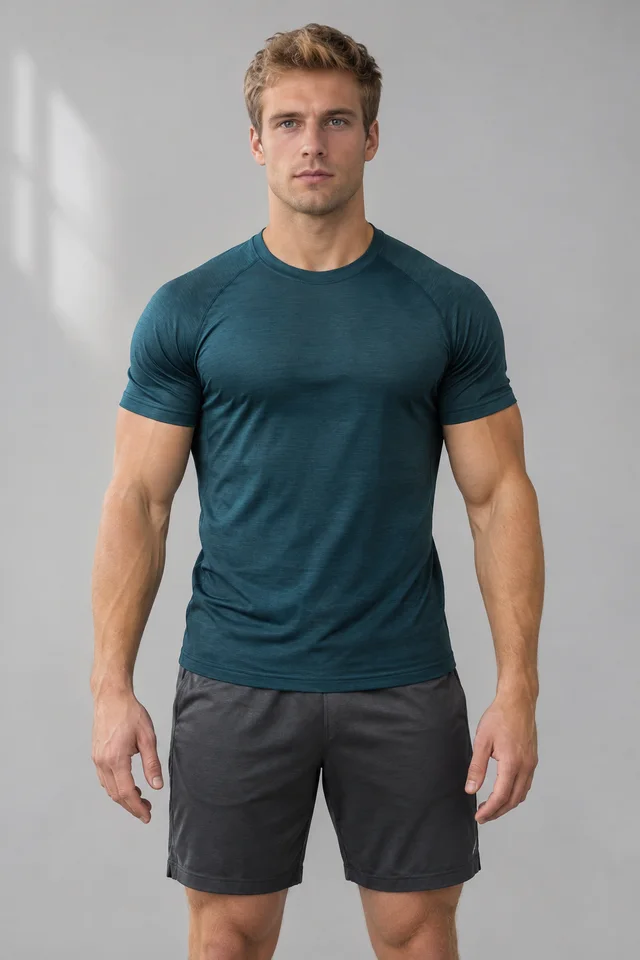
Front-facing portrait of a man in a teal athletic shirt

Generated MP4

Input: One studio front-facing portrait of a man in a teal athletic shirt.

Result: Preserves facial structure, hairstyle, and teal shirt through the opener, sideways dumbbell curl, and three “huss” exhales with synced audio and no watermark.

Recorded 2026-11-25 · Unedited 480p output with original sound

03 / Walkthrough

Step by step

  1. 01

    Open the generator

    Go to the Huss Huss Huss AI video generator on husshusshussai.org. You can pick a photo, watch the reference clip, and review credit pricing before signing in.

    Open the Huss Huss Huss AI video generator
  2. 02

    Upload your photo

    Add one front-facing photo of the person, dog, cat, or character you want in the gym scene. Unobstructed faces and upright chest-up framing keep identity most consistent.

  3. 03

    Pick 480p or 720p

    Choose 480p (100 credits, one $6.99 Starter pack) for the lowest per-video price, or 720p (300 credits, one $19.99 Creator pack) for sharper detail.

  4. 04

    Sign in and generate

    Confirm photo permissions, sign in with sufficient credits, and start the render. If a provider job fails outright, the charged credits are returned automatically.

  5. 05

    Download your watermark-free MP4

    Open My creations to download your finished 15-second MP4 privately. The “In This Town” narration and three huss breaths are already synced onto the file — no external video editor needed.

04 / AI template vs. CapCut

Do you need CapCut to make this trend?

No. husshusshussai.org uses a built-in AI generation workflow rather than a CapCut template. You do not need to source the audio clip, split beat markers, or sync lip movements manually in CapCut.

WorkflowDetails
Built-in AI workflowUpload one photo on husshusshussai.org and download a watermark-free 15-second MP4 with the original sound already synced.
CapCut templateshusshusshussai.org does not offer a CapCut template and does not require CapCut. Manual CapCut editing is only needed if you want to cut extra clips or add overlays after downloading.
Audio rights noteThe original sound is included on the finished MP4, but the service does not own or grant rights to the audio track.

05 / Quality settings

480p or 720p?

Both options produce the same watermark-free 15-second vertical gym clip with the exact same original sound.

480p · Standard

100 credits

1 Starter pack ($6.99)

Ideal for mobile vertical feeds at the lowest per-video price — the exact quality shown in the real examples on this site.

720p · HD

300 credits

1 Creator pack ($19.99)

Best if the clip will be watched on larger screens, pinned to a profile, or cropped further.

06 / Quick fixes

If it doesn’t look right

Most uneven results come from photo angle or cropping rather than settings. Swapping in a straighter, well-lit front-facing photo solves nearly every issue.

What looks offFast fix
Face drifts or mouth looks offUse a straight-on photo with even lighting and an uncovered mouth.
Outfit shifts mid-clipUpload a chest-up shot where the top half of the outfit is clearly visible.
Pet looks too humanUse a front-facing photo of your pet sitting up instead of a side profile.
See the full troubleshooting table on the home page

07 / Ready to share

Sharing it

The “In This Town” narration and three huss breaths are already synced onto your downloaded watermark-free MP4, so you do not need to layer the audio track twice. Note that we deliver the finished video only and do not grant rights to the audio track.

“everyone in this town went out. i went to the gym. huss huss huss”

“POV: the whole town is partying except me”

“he doesn’t party. he trains. huss.”

Hashtags: #husshusshuss #inthistown #gymtok

08 / FAQ

Common questions

How do I make a Huss Huss Huss AI video?

Upload one front-facing photo on husshusshussai.org, pick 480p (100 credits) or 720p (300 credits), sign in, and generate. Your finished watermark-free 15-second MP4 with the original sound appears in My creations.

Do I need CapCut to make the Huss Huss Huss gym video?

No. husshusshussai.org uses a built-in AI generation workflow rather than a CapCut template, and it delivers the 15-second clip with the original sound already synced.

Is there a free Huss Huss Huss AI video generator?

New accounts on husshusshussai.org start at 0 credits, and there is no free finished video — real GPU rendering is required. One watermark-free 480p video uses a single $6.99 Starter pack with no subscription, and failed provider jobs are refunded automatically.

Are finished videos watermark-free?

Yes. Every 480p and 720p MP4 downloaded from My creations is watermark-free.

Can I use a photo of my dog or cat?

Yes — a dog, cat, person, or character all work in the gym version. Use an upright, front-facing pet photo with the head and chest in frame.

Do I need to add the sound myself when I download?

No. The “In This Town” narration and the three huss exhales are already on the downloaded MP4. We do not own or grant rights to the audio track.

How can I make a Huss Huss Huss video on my phone?

Open husshusshussai.org in Safari, Chrome, or any mobile browser on iPhone or Android — no app install is required. Upload a front-facing photo from your camera roll, pick 480p or 720p, sign in with credits, and download the watermark-free 9:16 MP4 directly to your phone for TikTok, Instagram Reels, or YouTube Shorts.

What image formats and photo sizes can I upload?

Upload JPEG, PNG, WebP, or GIF up to 20 MB, with each side between 300 and 6000 pixels and an aspect ratio between 0.4 and 2.5.

What prompt does the generator use?

A fixed gym template prompt is built in — you never have to write one. See the full breakdown on the Huss Huss Huss prompt page.

Ready? One photo is all it takes.

Upload one photo on husshusshussai.org and download a watermark-free 15-second gym MP4 with original sound — from $6.99.

Make my Huss Huss Huss video — from $6.99

Keep reading